 Orisod
Common situations where blurring matters
- Group photos shared publicly: not everyone in a photo has consented to being posted publicly, especially children or people who happened to be in the background.
- Screenshots with visible personal information: an email inbox, a chat conversation, a document with a name or account number visible in the background of an otherwise unrelated screenshot.
- License plates and addresses: a photo of a car, a house, or a delivery package can inadvertently reveal a plate number or street address.
- Documents and IDs: sharing a photo that includes a visible ID card, passport, or official document in frame.
You rarely need to blur the entire image. Select only the detail that should not be public.
How targeted blur hides detail
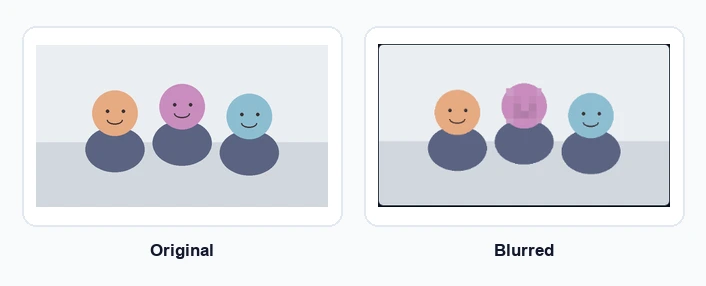
Blur removes fine detail from a selected area while leaving the rest of the image intact. At sufficient strength, facial features stop being recognizable and characters can no longer be read. It also blends into a photograph more naturally than a solid rectangle, although either method can protect information when applied correctly.
How strong does the blur need to be?
A light effect may leave a familiar face recognizable or text partly readable. Increase the strength until the information remains obscured when the image is enlarged. For highly sensitive material, use a solid opaque cover or remove the area entirely rather than relying on a decorative blur.
Privacy blur vs. background blur
A privacy edit targets a face, plate, or piece of text. A background blur is an artistic depth-of-field effect that softens a broad area behind the subject. For privacy, mark each sensitive region individually and leave unrelated parts of the image sharp.
How to do it
Mark the face, plate, or text you want to hide, then adjust the strength while checking the preview. Add a separate selection for every sensitive area and inspect the exported image at full size before sharing it.
Check before you post
Review the image before the first upload. Once an unedited copy has been downloaded, captured, or reshared, replacing the original post cannot update every copy. Look at the background as carefully as the main subject.
Privacy questions before sharing
Can someone reverse the blur? A properly flattened export no longer contains the original pixels in that area. Weak blur may still reveal enough structure to identify a face or infer text, so strength matters.
Is pixelation safer? Neither method is automatically safer. Both must remove enough detail to make the information unusable.
Should children's faces be blurred? Consider consent, the audience, and how public the post will be. A photo shared openly deserves more caution than one kept within a small private group.
Blur a face or sensitive detail
Select one or more areas, adjust the blur, and inspect the result before downloading. Orisod processes the photo locally in your browser.
Blur an area →Inspect the final image at full size before posting. Privacy depends on what the exported file reveals, not on how the preview looked while editing.