 Orisod
How wide or uneven margins appear
A flatbed scanner may capture the full glass area, an export preset may add padding, or the source may have been designed for another paper size. Before cropping, confirm that the blank region is genuinely unwanted and not reserved for binding, notes, stamps, print bleed, or accessibility annotations.
PDF cropping usually changes the visible page box
A structural crop moves a page box inward rather than rasterizing the page. Content inside the new boundary can retain its text and image data. Material outside that boundary may remain in the PDF and could be revealed by other software, so cropping is not a secure way to remove confidential information.
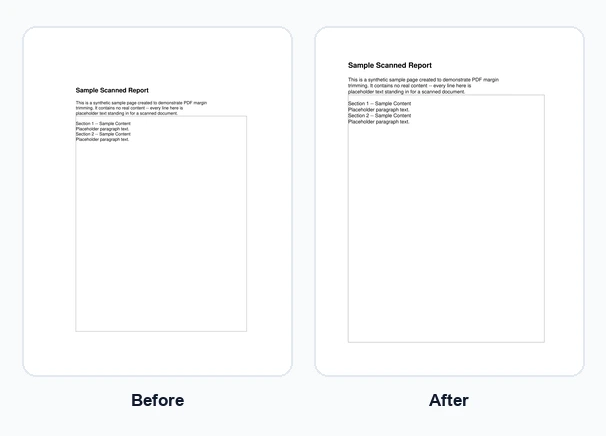
Choose margins with the whole document in view
Top, bottom, left, and right may require different values. Start conservatively, preview the result, and inspect pages with headers, footers, signatures, stamps, and handwritten notes. One page can extend farther than the others even when the scan appears uniform.
What to verify after cropping
When the tool applies one set of measurements to every page, mixed page sizes and orientations need particular care. Open the downloaded copy and check every page. Bookmarks, annotations, links, form fields, page boxes, and digital signatures may also require verification after the PDF is rewritten.
Example: removing unused scanner-bed space
You scan a receipt or a single-page form on a flatbed scanner set to capture a full A4 area, but the actual content only fills the top third of the page. Instead of rescanning at a tighter crop setting, you'd trim roughly 150mm off the bottom and a smaller amount off the sides: one pass, and the result is a page sized to the content instead of the scanner bed.
Questions before cropping PDF margins
Does cropping permanently delete hidden content? Not necessarily. A page-box crop can hide content without removing its underlying objects. Use a proper redaction or sanitization workflow for sensitive material.
Can I crop different amounts from each side? Yes, top, bottom, left and right are independent, so uneven margins are easy to fix without over-trimming a side that was already fine.
Can I crop a multi-page PDF? Yes, but uniform measurements are safest when the pages share the same size, orientation, and margin pattern. Review each page before replacing the original.
Trim your PDF's margins
Orisod's Crop PDF Pages tool lets you enter exact top, bottom, left and right measurements and applies them to every page, entirely in your browser.
Crop PDF pages →Cropping is appropriate when excess space is the only problem. Keep the source file, inspect the cropped copy, and rescan or re-export if the page is incomplete, blurred, or otherwise defective.